This week was the biggest in a long time. The common thread for FamilyManager: you should find what you’re looking for faster, and the web and the app should feel the same. GymBo got supersets and circuits into shape. And at the end I’ll show you how I manage all of this alongside my full-time job.
FamilyManager: a week of tidying up, aligning and new things
Everything listed here is in version 2.2.7. It’s in testing right now (TestFlight, build 611) and isn’t in the App Store yet. As soon as it’s live, I’ll let you know here.
Finding your way around more easily
- New navigation: Fixed tabs, the organisation section is arranged differently, and modules you don’t need can be hidden.
- Your profile at the top left: The avatar opens your profile, and settings are the first row there.
- One search instead of three: The global search finds tasks, events, documents and more, and for events it jumps straight to the date.
- Help page: New, with directions right in the app.
Today and tasks
- “Today” shows the same tasks on the web and in the app. Overdue items are at the top, tomorrow’s tasks are gone, and “This week” is now visible by default.
- Unified task row: It looks the same everywhere. The checkmark icon on the left is gone.
- Bulk actions: Complete, archive or delete several tasks at once. Parents can approve several submitted tasks directly on “Today”.
- Title suggestions when creating tasks and events.
- Tasks without credits are possible.
- Subtasks can be ticked off on the family board. The last step completes the task.
- Fewer notifications: The task push now goes only to the people affected instead of the whole household.
Calendar and custody schedule
- Custody schedule right in the calendar, with each person in their own colour. The countdown shows the handover day.
- Share events with a connected household, for example with the other parent. This is a switch that only takes effect with the store build.
- Birthdays now also appear in the iPhone calendar. Multi-day events with a time work on the web.
- Monthly events (“every 15th”) can be saved.
Family, credits, security
- Credit overview with balances and a leaderboard. The leaderboard on “Today” shows the week’s XP.
- Member profile: Profile pictures, a contact card and a rough presence indicator. If you tap a family member in the organisation section, you see their card.
- Passwords: Even when the parents’ vault is locked, shared passwords stay visible. Search in the safe now respects the child filters.
- Checklists are shared by default, and for the notebook you can choose the permissions.
- Sign-in: “Sign in with Google” is built into the iPhone app.
- Many smaller alignments affect shopping, meal plan, notes, expenses, care log and texts.
Still in progress
These things aren’t in testing yet:
- Gifting to a family: Give a month of Premium as a gift via an Apple offer code. It’s built, but not enabled yet.
- More alignments between web and app, a larger selection of task icons, and a board dialog that closes when you tap outside it.
GymBo: supersets and circuits run smoothly
If you train with supersets or circuits, you now get a clearer view. The groups are marked, and you can move them as a block. Plans start in the right order and are preserved when you save them.
The statistics (mesocycle, history, comparison) count all exercises, even if one appears several times in a workout. On the Apple Watch, left and right now alternate even without iCloud sync. A broken plan no longer aborts the sync.
Roadlight and TrackForKids
Quiet this week: there were no new changes in either project.
How it works alongside everything else
I get asked this question a lot: “How do you actually manage all this?” Alongside my full-time job, I build FamilyManager. The honest answer: not by working more, but by putting a lot of time into the process and hardly any into individual manual steps.
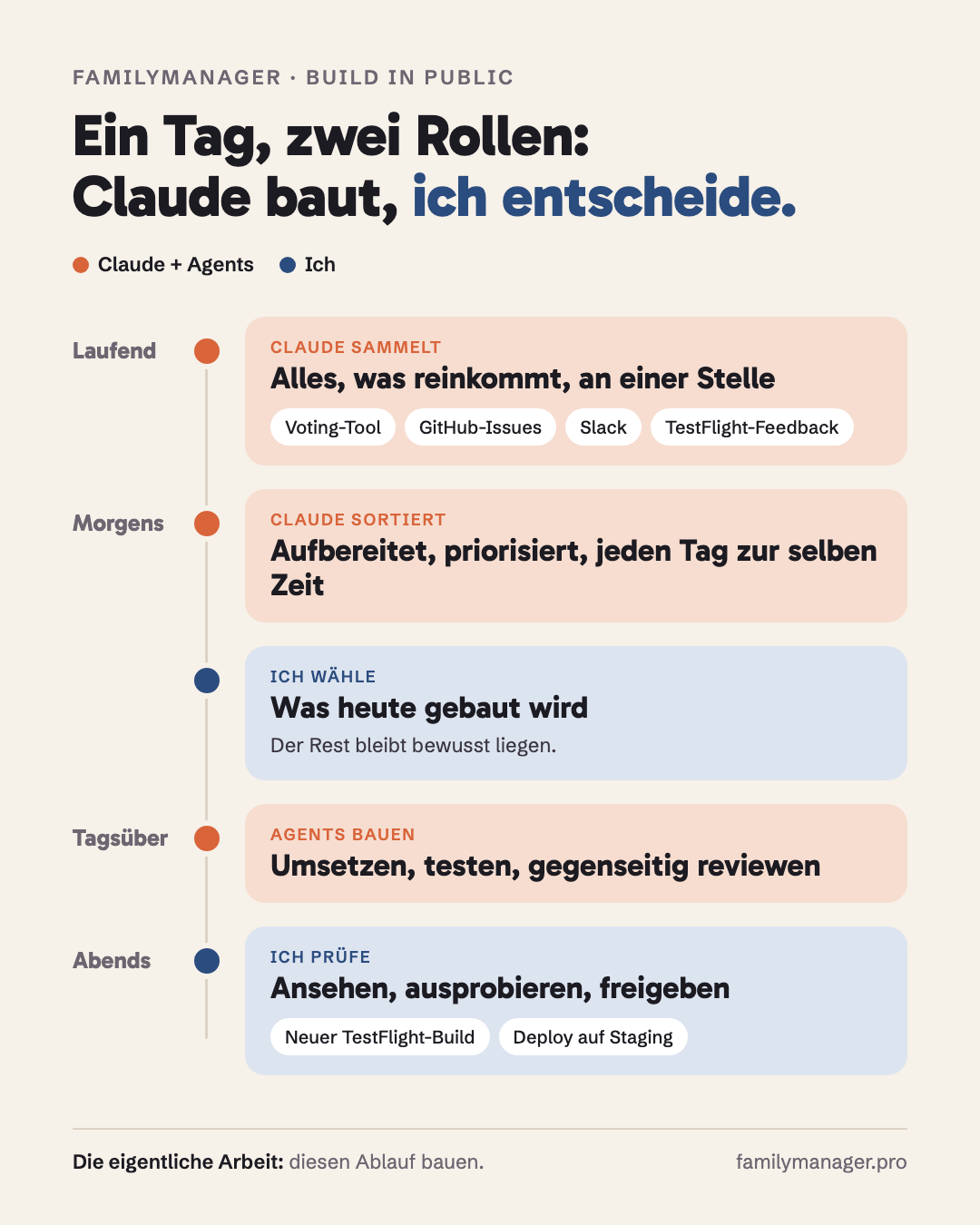
This is what a normal day looks like:
- Claude automatically collects whatever comes in: requests from our voting tool, issues on GitHub, messages from Slack, feedback from TestFlight.
- In the morning, everything is waiting for me, prepared: sorted, prioritised, with an assessment.
- I choose what gets built today. Everything else deliberately stays where it is.
- During the day, while I’m at work, AI agents work through the tasks: planning, implementing, testing, reviewing each other.
- In the evening, I look at the results, try them out and approve them. Then a new test build goes out.
This only works because I’m needed myself at three points: prioritising (what really helps families?), reading plans (is this technically right?) and reviewing (green tests don’t mean it feels right yet).
You can build really good things on the side, but not by shouting a wish at an AI. You do it by automating what repeats and keeping the decisions yourself.
What have you already automated that gives you time back every day? And what’s still missing for you in FamilyManager? Write to me.